Managing restaurant bills accurately is an important part of running a successful food business. Whether you operate a small cafe, a busy QSR, a family restaurant or a fine-dining establishment, your billing process affects service speed, payment accuracy and daily operations.
Should you continue with handwritten bills or switch to a digital billing solution? This guide compares the manual billing process with restaurant billing POS software and explains which approach may suit different restaurant formats.
What does manual billing mean?
Manual billing means recording customer orders, calculating item prices, adding applicable taxes and preparing bills by hand—usually with a pen, paper or calculator.
A manual billing system may work for a small food outlet with very few daily transactions. As customer volume increases, however, maintaining accurate bills and reviewing sales records can become more difficult.
A neighbourhood tea stall may write down each customer's order, calculate the total and collect payment manually. The process is simple, but the owner or cashier must handle every calculation and maintain the records.
What is POS billing for restaurants?
POS, or Point of Sale, billing uses digital software to record transactions, calculate bills and manage payment records through a compatible computer, tablet or POS terminal.
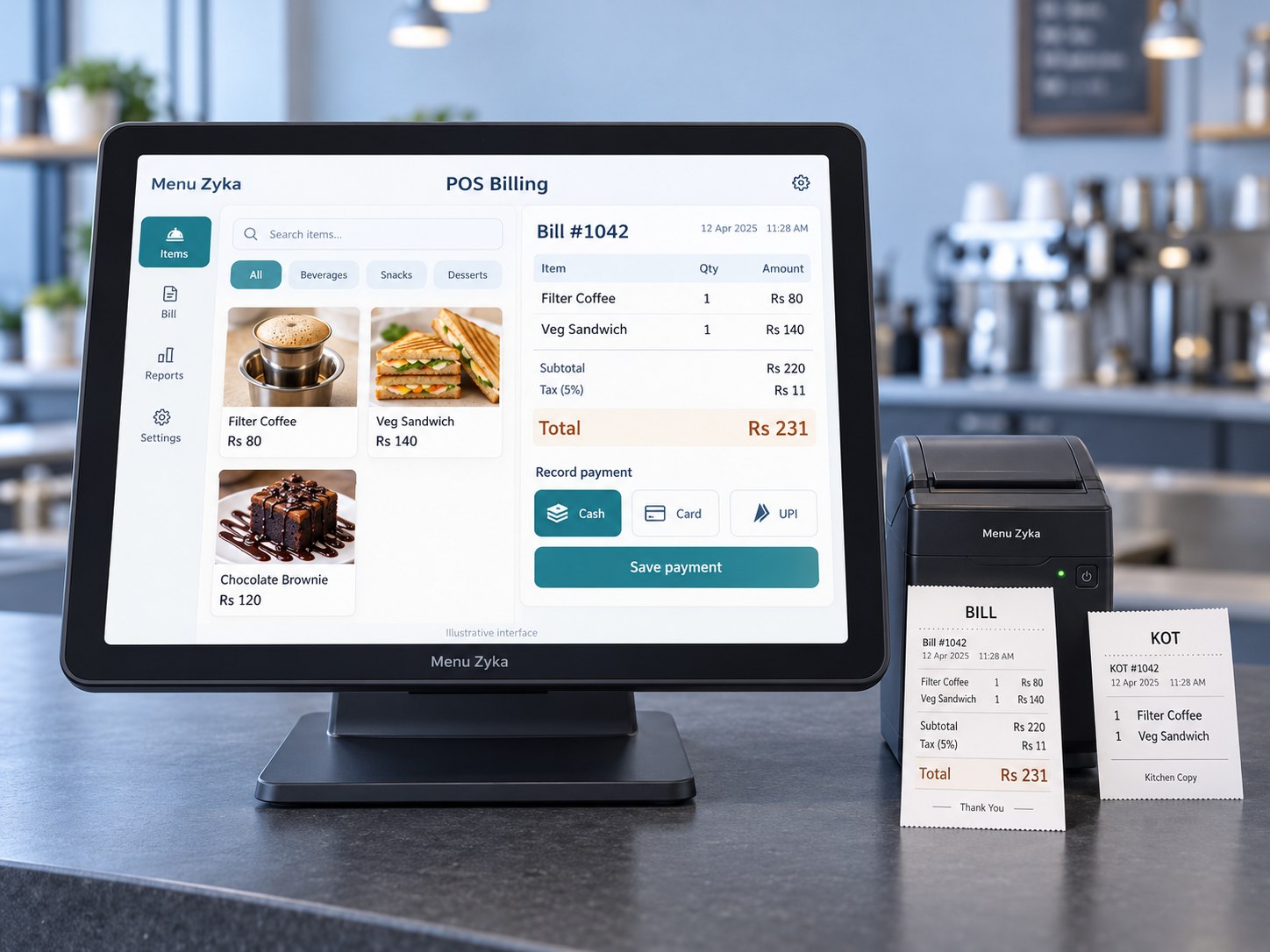
A restaurant billing POS software solution can help staff select menu items, apply configured taxes or service charges, generate bills and record supported payment methods. Depending on the product, it may also provide transaction history and sales reports.
A busy cafe can select items from its POS screen, generate a bill in a few steps and record whether the customer paid by cash, card or UPI.
Manual billing vs POS billing: key differences
| Area | Manual billing | POS billing |
|---|---|---|
| Bill calculation | Handled by the owner or cashier | Calculated using configured items, taxes and charges |
| Transaction record | Paper register, bill book or separate spreadsheet | Stored digitally within the available software workflow |
| Payment recording | Written down manually | Recorded against supported payment methods |
| Sales review | Requires manual consolidation | May be available through transaction history and reports |
| Setup | Minimal equipment | Requires compatible software and hardware |
| Best suited to | Very small volumes and simple operations | Frequent transactions or more structured restaurant workflows |
When comparing POS vs billing, remember that billing is the process of preparing a bill and collecting payment. A POS system can manage billing along with other related sales activities.
Which billing method suits different restaurant formats?
1. Small cafes and tea shops
A small cafe may initially manage with manual billing. When orders increase, POS billing can make item selection, calculations and payment recording easier to organise.
2. Quick-service restaurants
A burger outlet, pizzeria or fast-food counter often handles many orders within a short period. A billing POS for restaurant operations can help staff generate bills and maintain structured transaction records.
3. Family restaurants
Family restaurants manage multiple menu items, dine-in bills, discounts and payment methods. A restaurant POS can simplify billing and give owners a clearer way to review daily sales activity.
4. Fine-dining restaurants
Fine-dining establishments may need more than basic billing. The right POS workflow can support waiter-entered orders, kitchen communication and consolidated billing, depending on the selected solution.
5. Cloud kitchens and takeaway outlets
Takeaway businesses need organised order and payment tracking. POS billing can manage transactions, while a dedicated takeaway workflow can support order preparation and collection.
How to use restaurant billing software
If you are new to digital billing, the usual process is straightforward. Exact steps vary by product and configuration.
- Add or select menu items from the POS screen.
- Enter quantities and applicable add-ons.
- Review the bill and apply eligible discounts or configured charges.
- Select the customer's payment method.
- Generate and print or share the bill using the supported options.
- Review transaction records and available sales reports.
Do you need a restaurant billing POS machine?
A restaurant billing POS machine usually refers to the device or terminal used to operate billing software. Depending on the setup, this may be a computer, tablet or dedicated POS terminal connected to compatible printers and peripherals.
Check before choosing a setup
- Supported computers, tablets or POS terminals
- Bill and KOT printer compatibility
- Internet and offline-operation requirements
- Installation, training and support
- Software subscription and hardware costs
Retail POS and restaurant POS are not always the same
Searches for POS billing retail restaurant software often combine two related use cases. Both retail stores and restaurants need transaction management, but restaurant billing software should also suit menu items, taxes, service charges and the relevant order workflow.
Manual billing and restaurant POS FAQs
Is POS billing better than manual billing for restaurants?
POS billing can be more convenient for restaurants handling frequent transactions because it automates calculations and maintains digital records. Manual billing may still work for very small businesses with limited transactions.
Can a restaurant use POS billing without a dedicated POS machine?
Depending on the software, billing may be available through a compatible computer or tablet. Check the provider's hardware requirements before purchasing equipment.
Does restaurant POS software help with sales reports?
Many restaurant POS systems provide sales reports, transaction histories and payment summaries, helping owners review business performance.
Is restaurant billing software suitable for small restaurants?
Yes. Small restaurants and cafes can use billing software to organise transactions, record payments and maintain more consistent billing processes.